Update: 5 October 2026
The current portfolio lists My Recipes as live on iOS and Android. It now includes meal planning, shopping lists and server-side AI import. The earlier Android-only, local-MVP notes below document the May 2026 stage, not the current release.
My Recipes: native recipe import and offline planning
Original engineering notes from May 2026
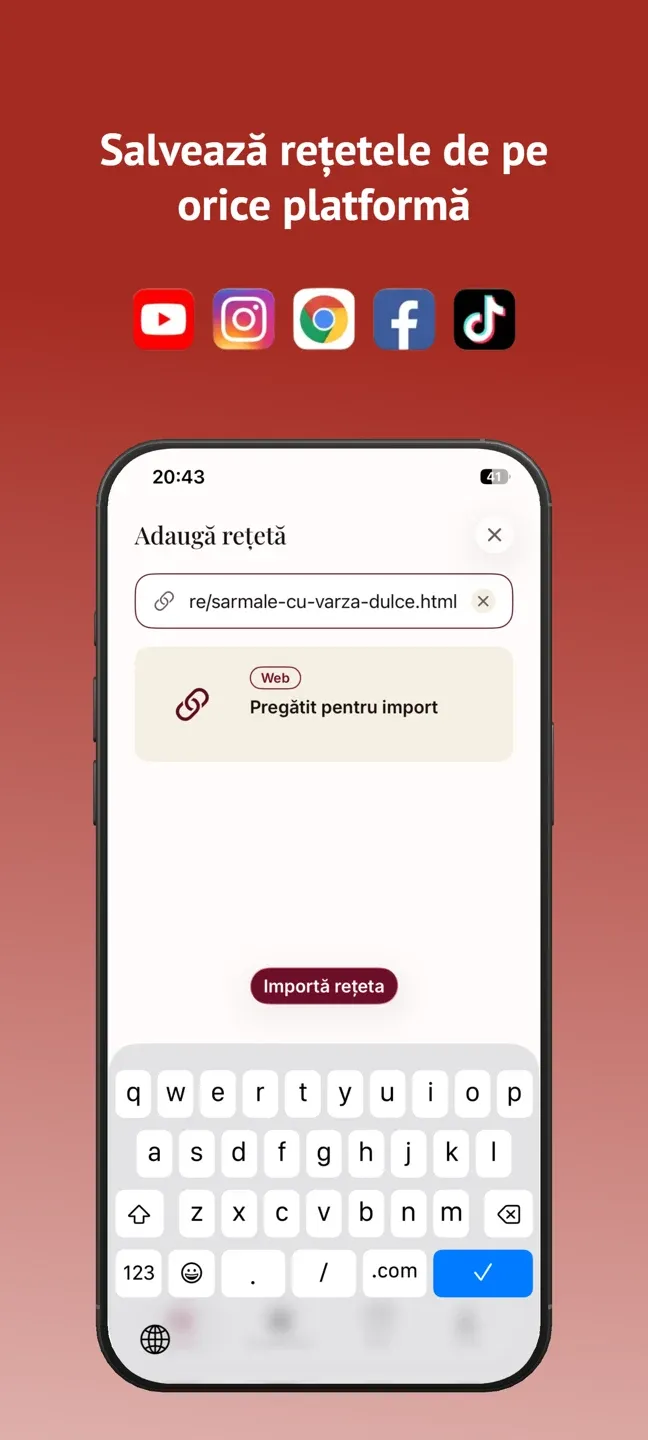
Rețetele Mele is a recipe organizer for Romanian home cooks who keep their favorites scattered across a dozen food blogs, a YouTube channel, and a few screenshots they'll never find again. You paste a link, the app pulls out the actual recipe — title, ingredients, steps — and files it in a collection you can search offline. No retyping. That's the whole pitch, and it's a chore I was tired of doing by hand.
The app is native Android backed by a Django server. It's an MVP: it works locally, and I haven't deployed it yet. I'm writing this up while it's still honest about what works and what's aspirational, because the interesting parts are the engineering decisions, not a launch announcement.
One-tap import: a cascade, not a parser
The core feature is import. You give the app a URL, and a Celery worker on the backend goes and fetches the page. Then it tries to extract the recipe through a cascade, cheapest and most reliable strategy first:
- JSON-LD. A lot of recipe sites already publish structured
Recipedata in a<script type="application/ld+json">block, because it's what powers Google's rich results. If it's there, parsing it is fast, free, and accurate. I read it withextruct. - HTML extraction. If there's no structured data, I fall back to pulling the main content out of the page with
trafilatura, which is good at stripping nav, ads, and comment sludge down to the article body. - AI extraction. If the page is still a mess — and a lot of food blogs are 1,200 words of childhood anecdote wrapped around six ingredients — the cleaned text goes to the model, which returns a structured recipe.
The point of the cascade is resilience. Each layer only runs when the one above it fails, so the common case (a blog with proper JSON-LD) costs nothing and the hard case still resolves. Import typically lands in the 2–10 second range depending on which layer does the work. I dig into this multi-strategy pattern more broadly in the piece on keeping AI keys off the device; the short version is that structured-data-then-AI-fallback is a pattern I now reach for constantly.
A note on the headline feature. The README advertises import from the web, YouTube, TikTok, and Instagram, and YouTube fits the cascade cleanly. I want to be straight about social video: the documented, working path is generic URLs and YouTube. TikTok and Instagram are on the roadmap and listed in the marketing, but I'd be overselling it to claim they're fully there today. The cascade is designed to absorb them — it's a fetch step plus an extraction step — but "designed to" and "shipped" are different claims.
Nutrition you didn't have to type
Once a recipe is saved, the app can estimate nutrition for it. That's a separate async job that sends the ingredients to Google Gemini and gets back per-recipe nutrition. It's an estimate, not a lab analysis, and I treat it as one — Gemini is reading "two tablespoons of olive oil" and doing the math a person would, just faster.
Running it as a background job matters. Nutrition estimation isn't on the critical path of saving a recipe; you save first, the number fills in later. Decoupling it keeps the save instant and keeps a slow or rate-limited model from blocking the thing the user actually asked for.
Offline-first, then sync
The app is offline-first by design. Every write goes to a local Room database immediately, so saving a recipe, adding it to an album, or ticking off a shopping-list item is instant and works with no connection. Then a background WorkManager job syncs those changes up to the server when the network is around.
Conflict resolution is last-write-wins, server side. Two devices editing the same recipe is rare for a single user's collection, and LWW is the pragmatic call — simple, predictable, and good enough when the realistic conflict rate is low. I'd make a different choice for genuinely collaborative data, but a personal recipe box isn't that.
The gotcha worth flagging — because it bit me, and it bites everyone who builds this — is deletes. If "deleted" means "the row is gone locally," sync has no way to tell the server the row was deleted versus never-synced, and a naive last-write-wins will happily resurrect a recipe you threw away: device A deletes it, device B still has it, B's copy wins on next sync, and it's back. The fix is tombstones: a delete is a soft-delete, a flagged row that survives long enough to propagate, not an actual removal. Sync then carries the deletion as data. I've written up this and the rest of the patterns in the offline-first sync deep dive — the tombstone problem is the part I wish someone had warned me about earlier.
Beyond import, the collection side has albums, a shopping list, and a meal planner — the organizing layer that turns a pile of saved links into something you'd actually cook from.
Keys stay on the server
Every AI call, every secret, lives server-side only. The Android app never holds a Gemini key or a YouTube credential; it talks to my Django API, and the API talks to the providers. Auth is email plus JWT with refresh-token rotation, with Google Sign-In working and Apple Sign-In stubbed out (it returns a 501 for now).
The admin is where this gets interesting, and it's my favorite part of the build. It runs on django-unfold with live metrics, per-user quotas, and the ability to re-enqueue failed jobs. The AI prompts are editable from the admin, but they're immutable and versioned: editing a prompt creates a new version rather than overwriting the old one, and each version logs its cost and latency. So I can compare two prompt versions on what they actually cost and how fast they ran, and roll back if a "better" prompt turns out worse or pricier. Prompts are configuration, not code I have to redeploy, and they have a history I can reason about.
The stack
Backend: Python 3.13, Django 5.1, and Django REST Framework, with Celery 5.4 for the async import and nutrition jobs. Data sits in Postgres 17 behind PgBouncer, with Redis as the Celery broker and cache. Extraction uses httpx for fetching and trafilatura/extruct for the JSON-LD and HTML layers; AI is Gemini via google-genai. Observability is Sentry plus Prometheus, and the whole thing runs on Docker Compose, aimed at api.retetelemele.ro.
Android: Kotlin 2.1 with Jetpack Compose for the UI, Hilt for dependency injection, Room v3 for the offline store, Retrofit/OkHttp for networking, Coroutines and Flow for async, and WorkManager for background sync.
Where it's at, and what's next
Honest status: this is an MVP that works locally and is not deployed. Ten phases are done, the backend has 87 passing tests, and there's a functional Android build (versionCode 1, version 0.1.0). The production-infrastructure phase is explicitly deferred and not yet implemented — the app targets api.retetelemele.ro, but that's a destination, not a live address. There's no license on it yet, and iOS and Web are planned only.
What's next is the unglamorous list: stand up production infrastructure, actually deploy, and harden the social-video import so TikTok and Instagram move from roadmap to real. I'd also like more confidence around the sync edge cases — tombstone retention windows, partial syncs on flaky connections — before I'd call it done.
This is one of several products I'm building solo; if you want the wider context, here's how I'm shipping 11 products as a solo founder. And if recipe import or offline sync is something you're wrestling with, I send out the occasional build note — you can subscribe to the newsletter and follow along as Rețetele Mele goes from local MVP to deployed.