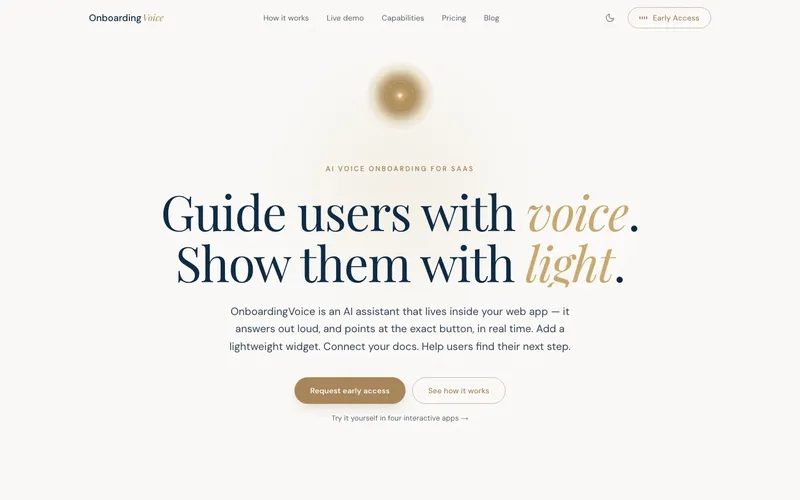
OnboardingVoice is a voice onboarding assistant you embed in any web app with a single script tag. A user talks to it the way they'd talk to a colleague sitting next to them — "okay, how do I invite my team?" — and it answers out loud while highlighting the actual button on the screen, scrolling to it, or dropping a tooltip where they need to look. The problem it goes after is one every SaaS team knows: in-app guidance is manual, brittle, and nobody enjoys building it. You hand-author a click-through tour, the design team ships a redesign two sprints later, and every selector in your tour quietly breaks.
I want to be straight up front: this one is a prototype. The local Docker stack runs end-to-end, the widget builds and serves, but it is not in production, the demo data population is broken on a schema mismatch, and several of the more ambitious pieces are planned rather than built. I'll mark what's real and what isn't as I go. It's still my favorite kind of project to write about, because the interesting decisions are all visible while the concrete is still wet.
The idea: voice instead of a click-through tour
Most onboarding tooling is a state machine over the DOM. Step 1: highlight this. Step 2: wait for a click. Step 3: highlight the next thing. It works until the UI moves, and it never adapts to what a specific user is actually confused about.
OnboardingVoice flips that around. Instead of a fixed tour, the assistant listens to what you ask, figures out which screen you're on, resolves the element you need, and responds with voice plus a visual cue — a highlight, a tooltip, a scroll, or a navigation. Under the hood it uses Driver.js for the spotlight overlays and Tippy.js for tooltips, with shadow-DOM support so the cues survive inside component-heavy apps without leaking styles into the host page.
The embed is deliberately boring: one script tag. That constraint shapes everything downstream. The widget itself is built as Lit web components in TypeScript, bundled with Rollup and tested with Vitest, specifically so it can live inside someone else's app without dragging a framework along with it.
Self-healing selectors
The feature I'm most attached to is what I've been calling self-healing selectors. CSS selectors are the load-bearing wall of any in-app tour, and they're also the first thing to crack when a SaaS UI changes. A class name gets renamed, a wrapper div appears, and your .btn-primary.invite-cta points at nothing.
The approach here is to not rely on a single selector. Each element gets a DOM "signature" — a bundle of signals like text content, role, position, and surrounding structure — and a set of fallbacks. When the primary selector misses, the resolver walks the fallbacks, and the intent is for AI to repair the reference by matching the signature against the current DOM and proposing a new selector. That's the self-healing part: the tour fixes its own broken references instead of silently failing.
I'll be honest about maturity. The signature-and-fallback resolution is the real, working spine of the system. The AI repair loop on top of it is the direction, not a finished, battle-tested feature. It's the kind of thing that demos beautifully and needs a lot of adversarial UIs thrown at it before I'd trust it on a customer's production app.
Voice-to-voice over WebRTC
The voice path is meant to be true voice-to-voice through WebRTC, proxying to the OpenAI Realtime API, with a separate speech-to-text plus text-to-speech path as a fallback for environments where the realtime connection isn't viable. The Django backend uses Channels and WebSockets to coordinate the session and shuttle events between the browser and the model.
This is the part I'd treat as partially implemented. The plumbing exists and the architecture is right, but "the WebRTC voice loop works end-to-end in production" is not a claim I can make honestly today. Keeping the model behind a server-side proxy is a deliberate choice, not an accident — the same reasoning I wrote about in keeping the keys off the device with a server-side AI architecture. A widget that ships to arbitrary third-party sites is the last place you want a raw API key.
The Studio and the AI labeler
For this to be usable by a SaaS team, someone has to tell the assistant what the screens and elements are. That's the no-code Studio: a configuration UI where each tenant defines screens, elements, intents, and onboarding flows. To avoid making that a soul-crushing manual exercise, there's a bookmarklet and Chrome-extension labeler that walks the live page and uses AI to suggest element labels and likely intents — you point it at your app, it proposes the map, you correct it.
The Studio is also where I made the most pragmatic compromise in the whole project. The backend is Django, but the Studio is a React 18 + Vite app with shadcn/ui talking to a small Node/Express layer and Supabase. The clean architecture would unify everything on Django and DRF. I didn't. Supabase gave me auth, a database, and row-level isolation for the Studio fast enough that unifying the stack would have cost me weeks for a benefit no user would ever see. For a prototype trying to prove the core loop, that was the right call. If it graduates, consolidating onto one backend is an obvious item on the list.
Hybrid RAG over your docs
Beyond walking the UI, the assistant is meant to answer questions from a tenant's own documentation. That's a hybrid retrieval setup: dense embeddings in pgvector alongside BM25 keyword search, so it catches both semantic matches and exact-term lookups. A Neo4j graph layer is planned to model relationships between features and flows, but planned is the operative word — it isn't built.
The stack
- Backend: Django 5 + DRF, Celery + Redis for async work, PostgreSQL with pgvector, Channels/WebSockets for the realtime session, OpenAI API, Sentry for errors.
- Widget: TypeScript + Lit web components, bundled with Rollup, tested with Vitest.
- Studio: React 18 + Vite + shadcn/ui, a Node/Express layer, and Supabase for auth and data.
- Landing: Next.js 16 + React 19 + Tailwind v4, PostHog for analytics, deployed on Vercel/Netlify.
- Infra: Docker Compose locally; Neon and ClickHouse are on the roadmap, not wired in yet.
Multi-tenant isolation is designed around per-tenant databases with event and analytics telemetry — designed being the honest word, since the production tenant databases aren't provisioned.
Where it's at, and what's next
Here's the candid status. The local Docker stack runs end-to-end and the widget builds and serves. The landing page is the only piece with real deploy config. The demo data population is broken on a schema mismatch, there are no production tenant databases wired up, and Neo4j, ClickHouse, and the higher-level orchestrator are unbuilt. I've described it to myself as "95% there" — but that's 95% of a local demo, which is a very different number from 95% of a product.
There's also a tell I'll own: this repo has 30-plus markdown status and fix files. That's what solo AI-assisted building actually looks like up close — a sprawl of "FIX_THIS.md" and "PHASE_3_NOTES.md" that documents the messy middle. It's not tidy, and pretending otherwise would be dishonest.
Next, in order: fix the schema mismatch so the demo populates cleanly, get the WebRTC voice loop verified end-to-end against a real app, and harden the self-healing resolver against UIs that are actively trying to break it. After that, the question of whether to provision real tenant databases and collapse the Supabase Studio back onto Django becomes a real decision rather than a hypothetical.
This is one of eleven products I'm building solo right now — if you want the wider context on how a project like this fits the portfolio, I wrote about building 11 products as a solo founder.
If you like watching prototypes get dragged toward production in public, with the broken parts left in, I send the occasional build note. You can subscribe to the newsletter — no spam, just the work.